Wednesday, May 8, 2019

LAB 6 : TCP/IP UTILITIES

Exercise 1: Host IP configuration
 
Open a command prompt window and type:
>ipconfig/all


Table 1: IPCONFIG UTILITY
 
Your host
MAC address
30-F7-72-3A-06-F1
IP address
10.8.214.58
Subnet Mask
255.255.252.0
Default Gateway IP address
10.8.215.254


Exercise 2: Network configuration and connection status
 
On a command prompt type:
>ping ip address or hostname
 
1. Ping your own host
 
2. Ping your neighbor on the same subnet 


3. Ping one host on a different subnet


4. Ping a host that is shut down (20.20.20.20)


Table 2 : Ping
Instruction
Sent
Received
Lost
Round trip times (Min)
Round trip times (Max)
Round trip times (Average)
1)
4
4
0 (0% loss)
0ms
0ms
0ms
2)
4
4
0 (0% loss)
2ms
8ms
5ms
3)
4
0
4(100% loss)
No result
No result
No result
4)
4
0
4 (100% loss)
No result
No result
No result


Exercise 3: Domain Name System (DNS)
 
Determine the local hostname of your machine by typing the following:
>hostname
 
Write down your local hostname here: Janapiriya10


You can run nslookup in interactive mode by typing:
>nslookup


 Table 3 : nslookup table
DNS server name
Address
ns5.uthm.edu.my
192.168.240.101


Question:
What do you understand from this laboratory exercise? Please explain your experience in a blog with your friends (your usual friends during lab session.

> From this lab exercise, I had learned about ping command which can be use to test the availability of a networking device (usually a computer) on a network. I learned how to ping the IP address or a hostname. Furthermore, I had understood that the ipconfig command displays all current TCP/IP network configuration values and give basic information such as IP address, DHCP Server IP address, subnet mask and more. Other than that, I had learned about nslookup command. It is a tool included in many operating systems that can look up IP addresses and perform other searches on DNS domains and servers.

Saturday, April 27, 2019

LAB 5: HTML & WEB PAGE

SOURCE CODE

<html>
<head>
<title>MY RESUME
</title>
<body>
<center>
<h1>
<u>MY RESUME</u>
</h1>
</center>
    <body style="background: url(https://www.setaswall.com/wp-content/uploads/2017/04/
    Pale-Gold-Solid-Color-Background-Wallpaper-5120x2880.png);background-repeat:
    no-repeat;background-size: 100% 100%">
    <h3><center><b>~ JANAPIRIYA RAMAN ~</b></center></h3><br>
    <img src=C:\Users\hp\Pictures\B612\B612_20171009_1436002_3.jpg align = right
    width = "160 height = 300 hspace=500 ">
    <h4><li>Age: 21</li></h4>
    <h4><li>Date of Birth: 10 October 1997</li></h4>
    <h4><li>Gender: Female</li></h4>
    <h4><li>Religion: India</li></h4>
    <h4><li>Nationality: Malaysian</li></h4>
   
       
    <br><hr color="grey" size="1.5" style="height:1.5px">
   
    <h2>
    <u><font color="#191970">CAREER OBJECTIVE</font></u>
    </h2>
   
    <ul><li>Seeking a challenging career with a progressive an
        organization that provides an opportunity to capitalize my technical skills
        and abilities in the field of information technology (IT).</li></ul><br>
   
    <h2>
    <u><font color="#800080">EXPERIENCE</font></u>
    </h2>
    <b>1.</b> Name of Company: Caelygirl Holdings (M) SDN.BHD.
        <ul> <li>Position: Machine Operator</li>
    <li>Duration: April 2016 - June 2016</li></ul>
  
    <u><h4><i>What I have learnt?</i></h4></u>
       
        <ol>
            <li>Set up machines to start a production cycle</li>
            <li>Feed raw material or parts to semi-automated machines</li>
            <li>Check output to spot any machine-related mistakes or flaws and <br>
            keep records of approved and defective units or final products.</li>
        </ol>
  
        <hr align="left" width="30%" color="#A0522D" size="0.3" style="height:0.3px">
   
        <b>2.</b> Name of Company:Nyok Lan Garments SDN.BHD.
        <ul><li>Position: Sales Coordinator</li>
        <li>Duration: November 2018 - August 2019</li></ul>
        <u><h4><i>What I have learnt?</i></h4></u>
        <ol>
        <li> Planning and coordinating sales activities</li>
        </ol>
   
        <hr align="left" width="30%" color="#A0522D" size="0.3" style="height:0.3px">
       
        <b>3.</b>Name of Company: Nyok Lan Garments SDN.BHD.
        <ul>Position: Internship under Maintenance Department</ul>
        <u><h4><i>What I have learnt?</i></h4></u>
        <ol>
        <li>Use spreadsheet to monitor the results of networking success</li>
        <li>Learn how to assemble and disassemble the computer or CPU</li>
        <li>Learn how to control the server</li>
        <li>Install/Uninstall programme</li>
        <li>Learn how to activate IP address in computer</li>
        </ol><br>   
   
    <h2><u><font color="#191970">ACADEMIC QUALIFICATION</font></u></h2>
    <b>1) </b>College: Polytechnic Balik Pulau, Penang.
    <ul><li>Course: Diploma in Information Technology (Programming)</li>
    <li>Year of passing: 2015 - 2018</li>
    <li>Marks/CGPA: 3.38</li></ul>
    <br>
       
    <b>2) </b>School: SMK Seri Perkasa, Perak.
    <ul><li>Course: Science Team</li>
    <li>Year of passing: 2010 - 2014</li></ul><br>
       
    <b>3) </b>University: Universiti Tun Hussein Onn Malaysia.
    <ul><li>Course: Computer Science (Web Technology)</li>
    <li>Year: First year student</li></ul><br>
       
    <h2>
        <u><font color="#800080">TECHNICAL SKILLS</font></u>
    </h2>
   
<style>
table, th, td {
  border: 1px solid green;
}
</style>
<body>
<table style="width:70%">
  <tr>
    <th>Skill</th>
    <th>Proficiency</th>
  </tr>
  <tr>
    <td>Microsoft Office </td>
    <td>Advanced</td>
  </tr>
  <tr>
    <td>HTML language</td>
    <td>Intermediate</td>
  </tr>
  <tr>
    <td>PHP</td>
    <td>Beginner</td>
  </tr>
 
   <tr>
    <td>Mobile application</td>
    <td>Intermediate</td>
  </tr>
 
   <tr>
    <td>Multimedia</td>
    <td>Advanced</td>
  </tr>
 

   <tr>
    <td>C language</td>
    <td>Intermediate</td>
  </tr>
 
</table>
</body><br>
       
<h2>
<u><font color="#191970">LANGUAGE PROFICIENCY</font></u>
</h2>
 
   
<style>
table, th, td {
  border: 1px solid green;
}
</style>
<body>
   
<table style="width:70%">
<tr>
<th>Language</th>
<th>Proficiency</th>
</tr>
<tr>
<td>Bahasa Malaysia</td>
<td>Good</td>
</tr> 
   
<tr>
<td>English</td>
<td>Good</td>
</tr>
   
<tr>
<td>Tamil</td>
<td>Good</td>
</tr>
</table><br>
   
<h2>
<u><font color="#800080">EXTRA CO-CURRICULUM</font></u>
</h2>
 
   
<style>
table, th, td {
  border: 1px solid green;
}
</style>
<body>
   
<table style="width:70%">
<tr>
<th>Club/Activities</th>
<th>Position</th>
<th>Year</th>
</tr>
<tr>
<td>Biomarin</td>
<td>Member</td>
<td>2016</td>
</tr> 
   
<tr>
<td>Scrabble</td>
<td>Member</td>
<td>2015</td>
</tr>
   
<tr>
<td>School Prefect</td>
<td>Treasurer</td>
<td>2012 - 2014</td>
</tr>
   
<tr>
<td>Tamil Language Association</td>
<td>Treasurer</td>
<td>2012 - 2014</td>
</tr>
   
<tr>
<td>English Club</td>
<td>Secretary</td>
<td>2011</td>
</tr>
   
<tr>
<td>Quarter Master-Malaysia School Youth Cadet Corps (KRS)</td>
<td>Committee Memeber</td>
<td>2011 - 2014</td>
</tr>
   
</table>
</body><br>
   
<h2>
<u><font color="#191970">PERSONAL QUALITIES</font></u>
</h2>
   
<ol>
<li>Have good interpersonal skills</li>
<li>Highly motivated</li>
<li>Have ability to work independently or as part of a team</li>
<li>Highly motivated</li>
<li>Think creative and confident</li>
    </ol><br>
   
<h2>
<u><font color="#800080">CONTACT DETAILS</font></u>
</h2>
   
 <h4><li>Email:
    <a href="mailto:janapiriya1097@gmail.com">janapiriya1097@gmail.com</a></li></h4>
    <h4><li>Website:
    <a href="https://janapiriya.blogspot.com/">https://janapiriya.blogspot.com/</a></li></h4>
    <h4><li>Website:
    <a href="https://www.linkedin.com/in/janapiriya-raman-334674180/">
    https://www.linkedin.com/in/janapiriya-raman-334674180/</a></li></h4>
    <h4><li>Facebook:
    <a href="https://web.facebook.com/janapiriya.raman">https://web.facebook.com/
    janapiriya.raman</a></li></h4>
    <h4><li>Contact No: 0165444324</li></h4>  
   
    <hr color="grey" size="1.5" style="height:1.5px">
   
    <center><img src="http://www.killersites.com/blog/wp-content/uploads/2012/04/icon-html.png"
    width="3%" height="6%"> </center>
    <p><h6><center><p>DESIGNED BY:</p></center></h6>
    <h6><center><p>JANAPIRIYA RAMAN</p></center></h6>
   
</body>
</body>
</body>
</head>
</html>


OUTPUT


Wednesday, April 3, 2019

LAB 4 : HTML COLORS & LISTS

My First Webpage>

My First Webpage

Welcome to my first webpage. I am writing this page using a text editor and plain old html.
By learning html, I'll be able to create web pages like a pro....
which I am of course.
Here's what I've learned:
  • How to use HTML tags
  • How to use HTML colours
  • How to create lists

LAB 4 : QUESTIONS WITH ANSWERS


HTML CODE

<html>
<head>
<title>My First Webpage</title>
</head>
<body bgcolor="#EDDD9E">
<h1 align="center">My First Webpage</h1>
<p>Welcome to my <strong>first</strong> webpage. I am writing this page
using a text editor and plain old html.</p>
<p>By learning html, I'll be able to create web pages like a pro....<br>
which I am of course.</p>
Here's what I've learned:
<ul>
<li>How to use HTML tags</li>
<li>How to use HTML colours</li>
<li>How to create lists</li>
</ul>
</body>
</html>


HTML CODE (NOTEPAD)


OUTPUT


1. Explain about the HTML code above
The HTML code is about the language working on displaying html file on a browser. The html file contains important parts such as head, title and body. Function of HTML tags :-
  • <html> - describes that this webpage is written in HTML.
  • <head> - Contains the information about the web.
  • <title> - Contains the webpage title.
  • <strong> - Text that has strong importance and it displays in bold..
  •  <body> - Contains the visible elements of the webpage.
  • <h1> - defines HTML headings where here the title is alligned to the center.
  • <p> - This element is used to identify blocks of paragraph text with a statement 'Welcome to my first webpage. I am writing this page using a text editor and plain old html'. The closing tag is optional and is implied by the opening tag of the next HTML element encountered in an HTML document after an opening tag.
  • <ul> - defines an unordered list.
  • <br> - This tag is to insert a single line break and later proceeding with 'which I am of course'.

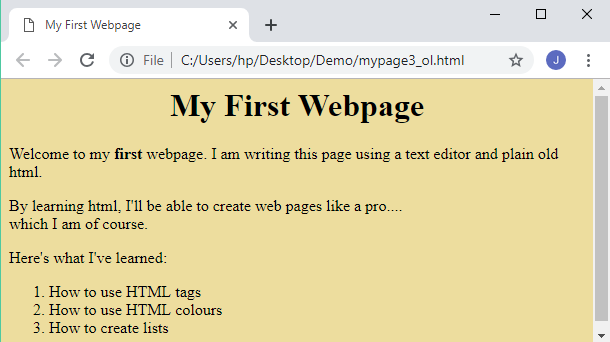
2. Change the given HTML code by using an ordered list tags.
    HTML CODE
     <html>
    <head>
    <title>My First Webpage</title>
    </head>
    <body bgcolor="#EDDD9E">
    <h1 align="center">My First Webpage</h1>
    <p>Welcome to my <strong>first</strong> webpage. I am writing this page
    using a text editor and plain old html.</p>
    <p>By learning html, I'll be able to create web pages like a pro....<br>
    which I am of course.</p>
    Here's what I've learned:
    <ol>
    <li>How to use HTML tags</li>
    <li>How to use HTML colours</li>
    <li>How to create lists</li>
    </ol>
    </body>
    </html>

      HTML CODE (NOTEPAD)


          OUTPUT


3. List 10 colours HEX value in HTML codes.

  •  #00000FF - Blue
  •  #808000 - Olive
  •  #800080 - Purple
  •  #C0C0C0 - Silver
  •  #00FF00 - Lime
  •  #FFFFFF - White
  •  #000080 - Navy
  •  #800000 - Maroon
  •  #FF0000 - Red
  •  #EE82EE - Violet


4. Provide a HTML code for definition lists.

HTML CODE 
 
<html>
<head>
<title>My First Webpage</title>
</head>
<body bgcolor="#EDDD9E">
<h1 align="center">My First Webpage</h1>
<p>Welcome to my <strong>first</strong> webpage. I am writing this page
using a text editor and plain old html.</p>
<p>By learning html, I'll be able to create web pages like a pro....<br>
which I am of course.</p>
Here's what I've learned:
<ol>
<li>How to use HTML tags</li>
<li>How to use HTML colours</li>
<li>How to create lists</li>
</ol>

<dl>
    <dt>Milk</dt>
    <dd>*White cold drink</dd>
    <dt>Coffee</dt>
    <dd>*Black hot drink</dd>
</dl>
</body>
</html>


HTML CODE (NOTEPAD)


      OUTPUT